Make the comparison fair
Match the camera conditions before judging the stones.
A spotlight can win this comparison before you look at either diamond. Start with the same shape, origin, and a similar quality target. Ask for the same background, magnification, exposure, angle, and movement. A spotlight video and a diffuse light video won't give you a fair comparison.
Open the videos side by side on the same screen. Turn off automatic brightness changes if practical. Pause at comparable angles, then watch each full rotation. A frozen frame helps locate an inclusion. Motion tells you whether a dark zone opens up or stays dark.
The viewing setup changes the comparison.
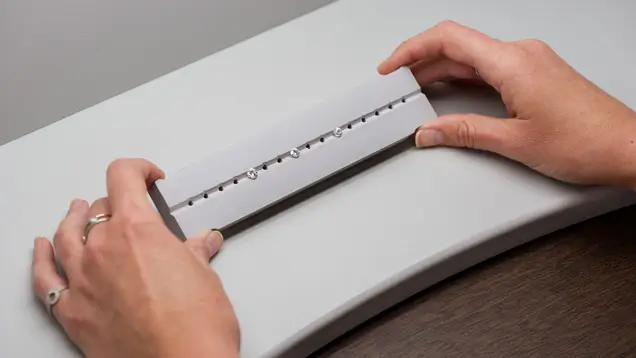
GIA used controlled viewing conditions in its cut research. You don't need this equipment to shop. You do need comparable lighting, backgrounds, and camera angles before calling one video brighter than the other.
Photo: GIA, cut grade research.
- Save the two listing URLs and report numbers.
- Ask whether both clips show the exact listed diamonds.
- Request the same diffuse lighting and a slow tilt for both stones.
- Compare millimeter measurements separately from the size of the on screen image.
Looking at one stone first? Start with our single diamond 360 video guide. Here, we're checking whether two sellers have shown you enough to compare their diamonds fairly.
GIA video comparison
Watch the contrast change as each diamond tilts.
Start with these two GIA demonstrations. They show how light and dark patterns behave in motion. GIA credits both recordings to Nicole Phelan. These are educational examples, not sale listings.
Changing, balanced contrast
Watch the bright and dark areas trade places as the diamond moves.
Video: Nicole Phelan/GIA.
Persistent dark areas
Watch the heavy spokes and outer dark zones through the tilt.
Video: Nicole Phelan/GIA.
Pause both at similar angles. Watch each full tilt, not just its brightest frame. For your own shortlist, request the same lighting and verify each report.
Changing contrast helps you see how the facets work. It doesn't settle transparency, inclusions, visible size, or price. Check those separately before choosing.
Source: GIA's research and explanation of these two demonstrations.
Two archived oval candidates
The grades match. The comparison is still unfinished.
These are real stock photographs from our diamond image archive. Both records list 1.01 carat, G color, VS2 clarity, and GIA. They aren't current offers or generated stones. We don't have matching videos, and we can't assume the lighting matches. Use the stills to spot questions, not pick a winner.
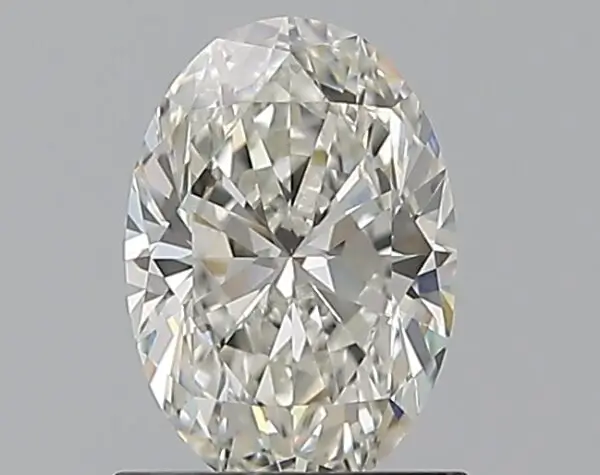
1.01 carat · G · VS2
7.93 × 5.47 × 3.47 mm
Excellent polish and symmetry
Fluorescence: Medium
The archived record lists GIA. We don't have the original report or a matching video here.
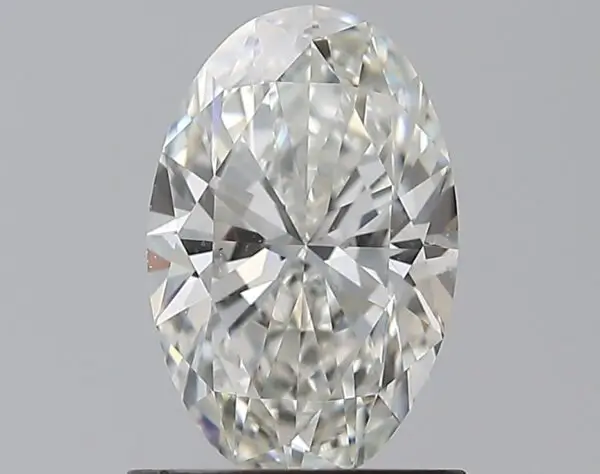
1.01 carat · G · VS2
8.39 × 5.45 × 3.41 mm
Excellent polish and symmetry
Fluorescence: None
The archived record lists GIA. We don't have the original report or a matching video here.
| Attribute | Candidate A | Candidate B |
|---|---|---|
| Stock reference | 220584-184 | 220697-19 |
| Length and width | 7.93 × 5.47 mm | 8.39 × 5.45 mm |
| Length to width ratio | 1.45 | 1.54 |
| Depth | 3.47 mm | 3.41 mm |
| Fluorescence in archive | Medium | None |
| Motion and transparency | Matching video needed | Matching video needed |
| Current price and availability | Not provided | Not provided |
Candidate B is 0.46 mm longer in the records. The width is almost the same. You're seeing a longer outline, not proof of better light return. I'd ask for the original reports and matching videos before putting either stone first.
The comparison method
Use three decisions: pass, ask, or reject.
| Check | What passes | What needs another look |
|---|---|---|
| Identity | Video, stock reference, and report all refer to the same diamond. | Representative footage, missing numbers, or a mismatch. |
| Lighting | Similar diffuse light, background, exposure, and viewing angles. | One clip uses strong spotlights or obvious overexposure. |
| Motion | The center and ends show changing brightness through a slow tilt. | A broad area stays dark through the useful viewing range. |
| Transparency | The clean diamond looks crisp in ordinary light. | A soft or milky look survives a better recording. |
| Clarity | The exact inclusion is located and assessed at a normal viewing distance. | Only an enormous closeup or a vague eye clean claim. |
| Size | Length and width are compared in millimeters. | The bigger video fills more of the screen and gets mistaken for a bigger stone. |
“Ask” means you still need an answer. “Reject” means you've confirmed a problem that matters, or the seller can't resolve a check you need. Don't turn missing information into a score that makes the choice look settled.
Comparing natural rounds with the same overall grade? Our two GIA Excellent examples show why the actual appearance still deserves a separate comparison.
Ovals, pears, and marquises
Watch the dark zone through the tilt.
Some contrast gives a brilliant diamond its pattern. A bow tie becomes a buying concern when a broad dark band dominates normal viewing and does not brighten as the stone moves. Ask for slow movement from straight on to a modest tilt, with the camera and light setup held constant.
GIA's fancy shape appearance research looks at how outline and facets affect appearance. That's why one proportion number can't settle a fancy shape. It doesn't tell us which of these two archived ovals to buy. We still need their videos.
Use our bow tie guide to frame the question. Do not apply a round diamond’s table and angle rules to an oval, and do not mistake “Excellent” in a supplier cut field for a GIA overall oval cut grade.
Find the dark zone, then watch it move.
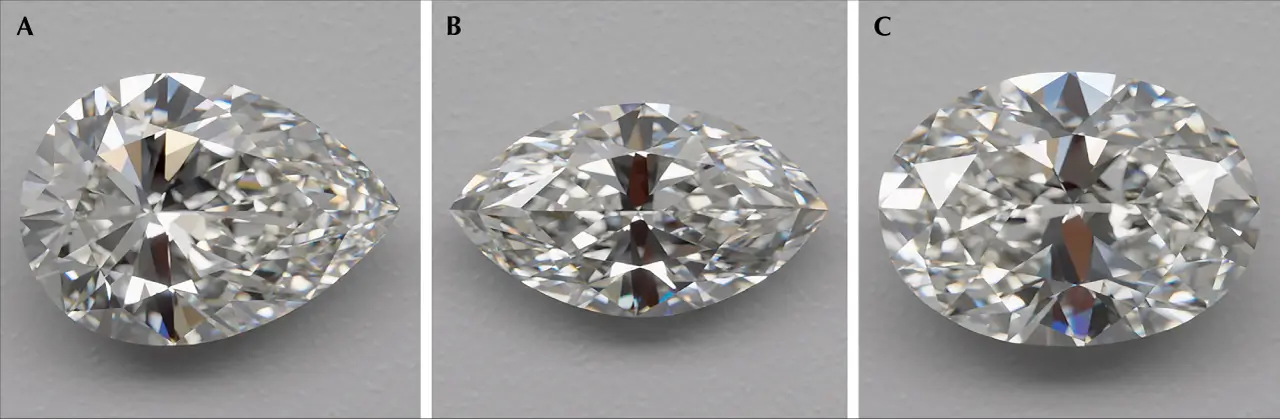
GIA's pear, marquise, and oval examples show different bow tie and reflection patterns. A still helps you locate the contrast. The video tells you whether that area lights up as the stone tilts. These are GIA research stones, not the archived candidates above.
Images: GIA, Gems & Gemology, Fall 2024, Figure 2.
Clarity and visible size
Zoom out before paying for a cleaner grade.
That 600 pixel diamond on your screen isn't life size. Ask whether you can see the inclusion without magnification at an agreed normal viewing distance. Check the top and other angles. Then ask about durability. Seeing an inclusion and worrying about damage are different questions.
Look specifically for a bruise, chip, cavity, knot, etched channel, or indented natural. Do not assume a tiny mark is harmless because it looks small in one frame. Do not assume a harmless crystal ruins the stone because magnification makes it look enormous.
For natural diamonds, start with GIA. Compare actual millimeter spread as well as carat weight. If two clips disagree on color, request the same neutral background and exposure before treating the video as a color grading test.
Buyer questions
Your questions, answered
Can I choose the better diamond from two retailer videos?
Use the videos to narrow the list. Match the lighting and reports first. If you still can't judge haze, inclusions, or a dark center, ask for another view before choosing.
Are these real diamond videos?
Yes. These are GIA's published diamond demonstrations, credited to Nicole Phelan. The players and source link take you to GIA's material. The ovals below are archived photographs, and we still need their matching videos and original reports.
Is a dark bow tie in one frame always bad?
No. Watch the diamond through a slow tilt. A dark area that brightens as it moves is different from a broad band that stays dark.
Why does one diamond look much bigger in its video?
Magnification, crop, and camera distance change the display size. Compare length and width in millimeters instead.